1. Introduction
Data quality validation is an essential step in building reliable data pipelines. Instead of relying on manual inspections, organizations increasingly use automated validation frameworks to detect data issues early and ensure consistent data quality over time.
This notebook demonstrates how to implement an automated data quality validation workflow using Great Expectations. The project covers the complete validation process, from defining expectations based on business rules to executing validations and generating documentation.
The examples use the OurAirports Argentina dataset to illustrate how data quality checks can be automated in a practical, reproducible, and maintainable way.
import great_expectations as gx
import pandas as pd
2. Dataset
Load the OurAirports dataset, select the columns required for validation, and filter the records to include airports located in Argentina.
# Load the worldwide airports dataset and select the relevant columns
airports_df = pd.read_csv("airports.csv")
airports_df = airports_df[['id', 'ident', 'type', 'name', 'latitude_deg', 'longitude_deg',
                           'elevation_ft', 'iso_country', 'gps_code']]

# Filter airports located in Argentina
argentina_df = airports_df[airports_df['iso_country'] == 'AR'].reset_index(drop=True)

# Display the first five rows
argentina_df.head()
| id | ident | type | name | latitude_deg | longitude_deg | elevation_ft | iso_country | gps_code |
|---|---|---|---|---|---|---|---|---|
| 35333 | AR-0001 | small_airport | Cullen Airport | -52.885740 | -68.414956 | 132.0 | AR | NaN |
| 35334 | AR-0002 | small_airport | Estancia Los Cerros Airport | -54.343000 | -67.837532 | 1914.0 | AR | NaN |
| 35335 | AR-0003 | small_airport | Rio Bellavista Airport | -53.982700 | -68.523598 | 201.0 | AR | NaN |
| 35398 | AR-0004 | small_airport | Merlo Airport | -32.358200 | -65.017403 | 796.0 | AR | NaN |
| 35399 | AR-0005 | small_airport | Bragado Airport | -35.145811 | -60.480294 | 196.0 | AR | SA2X |
3. Environment Setup
This project uses a persistent Great Expectations context rather than an in-memory configuration. Persisting the project structure allows expectations, validation results, and documentation to be managed consistently and prepares the project for future integration into automated data pipelines.
# Initialize the Great Expectations context
context = gx.get_context(project_root_dir="gx")
4. Creating the Validation Batch
Configure the data source, create a data asset, define a batch, and load the dataset into Great Expectations for validation.
# Create a Pandas data source
data_source = context.data_sources.add_pandas(
    name="local_pandas"
)

# Create a data asset
data_asset = data_source.add_dataframe_asset(
    name="airports"
)

# Create a batch definition
batch_definition = data_asset.add_batach_definition_whole_dataframe(
    name="whole_dataframe"
)

# Create a batch from the DataFrame
batch = batch_definition.get_batch(
    batch_parameters={
        "dataframe": argentina_df
    }
)

# Display the batch
batch.head()

  id    ident           type                         name  latitude_deg  \
0  35333  AR-0001  small_airport               Cullen Airport    -52.885740
1  35334  AR-0002  small_airport  Estancia Los Cerros Airport    -54.343000
2  35335  AR-0003  small_airport       Rio Bellavista Airport    -53.982700
3  35398  AR-0004  small_airport                Merlo Airport    -32.358200
4  35399  AR-0005  small_airport              Bragado Airport    -35.145811

   longitude_deg  elevation_ft iso_country gps_code
0     -68.414956         132.0          AR      NaN
1     -67.837532        1914.0          AR      NaN
2     -68.523598         201.0          AR      NaN
3     -65.017403         796.0          AR      NaN
4     -60.480294         196.0          AR     SA2X
5. Defining Expectations
The expectations implemented in this notebook are derived from business rules designed to validate the quality of airport data during the ingestion process.
The focus is on data quality rules that can be evaluated automatically against a single dataset, making them suitable for recurring validation workflows. These rules cover intrinsic data quality dimensions such as completeness, validity, uniqueness, and consistency.
Basic geographic validation is also included by verifying that airport coordinates fall within the approximate geographic boundaries of Argentina. This validation provides a simple sanity check to identify records with clearly invalid coordinates. More advanced geospatial validation rules, such as detecting airports located over water bodies, have been intentionally excluded because they require external spatial reference datasets and specialized geographic analysis beyond the scope of this notebook.
In production environments, it is also considered a good practice to implement reasonability checks. These rules compare consecutive data deliveries to detect unexpected changes, such as sudden increases in the number of records, unusual variations in data distributions, or spikes in missing values. However, since this notebook validates the dataset for the first time, no previous AIRAC cycle is available as a baseline for comparison. For this reason, reasonability rules are not included in the current implementation.
Different compliance thresholds have been defined according to the criticality of each business rule. The completeness of ident, latitude_deg, and longitude_deg is expected to reach 100%, as these attributes are essential for uniquely identifying and locating each airport. Likewise, the uniqueness of ident and the format of gps_code, when present, must also achieve 100% compliance.
For the remaining rules, a compliance threshold of 98% is applied. This tolerance reflects a realistic production scenario where a limited number of exceptions may be acceptable without significantly affecting the overall quality of the dataset.
| Rule ID | Business Rule | Quality Dimension | Threshold |
|---|---|---|---|
| DQ-001 | ident must not be null |
Completeness | 100% |
| DQ-002 | Latitude and longitude must not be null | Completeness | 100% |
| DQ-003 | Elevation must not be null | Completeness | 98% |
| DQ-004 | ident must be unique |
Uniqueness | 100% |
| DQ-005 | Airport coordinates must fall within the approximate geographic boundaries of Argentina | Validity | 98% |
| DQ-006 | Elevation must fall within an acceptable range | Validity | 98% |
| DQ-007 | If gps_code is available, it must be a valid four-character alphanumeric location identifier |
Consistency | 100% |
# Create Expectation Suite
suite = gx.ExpectationSuite(
    name="airport_data_quality_suite"
)

suite = context.suites.add(suite)

# Add Expectations

# DQ-001: ident must not be null (Threshold: 100%)
suite.add_expectation(
    gx.expectations.ExpectColumnValuesToNotBeNull(
        column="ident"
    )
)

# DQ-002: Latitude and longitude must not be null (Threshold: 100%)

suite.add_expectation(
    gx.expectations.ExpectColumnValuesToNotBeNull(
        column="latitude_deg"
    )
)

suite.add_expectation(
    gx.expectations.ExpectColumnValuesToNotBeNull(
        column="longitude_deg"
    )
)

# DQ-003: Elevation must not be null (Threshold: 98%)

suite.add_expectation(
    gx.expectations.ExpectColumnValuesToNotBeNull(
        column="elevation_ft",
        mostly=0.98
    )
)

# DQ-004: ident must be unique (Threshold: 100%)

suite.add_expectation(
    gx.expectations.ExpectColumnValuesToBeUnique(
        column="ident"
    )
)

# DQ-005: Airport coordinates must fall within the approximate
# geographic boundaries of Argentina (Threshold: 98%)

suite.add_expectation(
    gx.expectations.ExpectColumnValuesToBeBetween(
        column="latitude_deg",
        min_value=-56,
        max_value=-21,
        mostly=0.98
    )
)

suite.add_expectation(
    gx.expectations.ExpectColumnValuesToBeBetween(
        column="longitude_deg",
        min_value=-74,
        max_value=-53,
        mostly=0.98
    )
)

# DQ-006: Elevation must fall within an acceptable range (Threshold: 98%)

suite.add_expectation(
    gx.expectationas.ExpectColumnValuesToBeBetween(
        column="elevation_ft",
        min_value=-100,
        max_value=14000,
        mostly=0.98
    )
)

# DQ-007: If gps_code is available, it must be a valid
# ICAO location indicator (Threshold: 100%)

suite.add_expectation(
    gx.expectations.ExpectColumnValuesToMatchRegex(
        column="gps_code",
        regex=r"^[A-Z0-9]{4}$",
        row_condition="gps_code.notnull()",
        condition_parser="pandas"
    )
)
6. Running Validation
Before executing the validation, a Validation Definition is created. This object links together the data batch and the Expectation Suite, defining what data will be validated and which business rules will be applied.
Once configured, the validation can be executed repeatedly against new data batches without redefining the expectations, making the process suitable for automated data quality workflows.
# Create Validation Definition

validation_definition = gx.ValidationDefinition(
    name="airport_validation",
    data=batch_definition,
    suite=suite,
)

validation_definition = context.validation_definitions.add(
    validation_definition
)
7. Validation Results
The Expectation Suite is executed against the configured batch, and Great Expectations evaluates each business rule defined for the dataset.
To facilitate interpretation, the validation results are summarized in a business-oriented scorecard. For each rule, the report displays the quality dimension, the affected column, the expected compliance threshold, the observed compliance, and the final validation status.
This summary provides a concise overview of the dataset’s quality and highlights any business rules that require further investigation before the data is consumed downstream.
results = validation_definition.run(
    batch_parameters={
        "dataframe": argentina_df
    }
)
# Map each Great Expectations expectation to its corresponding
# business rule, quality dimension, and required compliance threshold
business_rules = {
    ("expect_column_values_to_not_be_null", "ident"): (
        "DQ-001",
        "`ident` must not be null",
        "Completeness",
        "100%"
    ),
    ("expect_column_values_to_not_be_null", "latitude_deg"): (
        "DQ-002",
        "Latitude and longitude must not be null",
        "Completeness",
        "100%"
    ),
    ("expect_column_values_to_not_be_null", "longitude_deg"): (
        "DQ-002",
        "Latitude and longitude must not be null",
        "Completeness",
        "100%"
    ),
    ("expect_column_values_to_not_be_null", "elevation_ft"): (
        "DQ-003",
        "Elevation must not be null",
        "Completeness",
        "98%"
    ),
    ("expect_column_values_to_be_unique", "ident"): (
        "DQ-004",
        "`ident` must be unique",
        "Uniqueness",
        "100%"
    ),
    ("expect_column_values_to_be_between", "latitude_deg"): (
        "DQ-005",
        "Airport coordinates must fall within the approximate geographic boundaries of Argentina",
        "Validity",
        "98%"
    ),
    ("expect_column_values_to_be_between", "longitude_deg"): (
        "DQ-005",
        "Airport coordinates must fall within the approximate geographic boundaries of Argentina",
        "Validity",
        "98%"
    ),
    ("expect_column_values_to_be_between", "elevation_ft"): (
        "DQ-006",
        "Elevation must fall within an acceptable range",
        "Validity",
        "98%"
    ),
    ("expect_column_values_to_match_regex", "gps_code"): (
        "DQ-007",
        "If `gps_code` is available, it must be a valid four-character alphanumeric location identifier",
        "Consistency",
        "100%"
    ),
}

# Initialize an empty list to store the scorecard rows
rows = []

# Iterate through each validation result
for result in results.results:

    # Retrieve the expectation type and the validated column
    expectation = result.expectation_config.type
    column = result.expectation_config.kwargs["column"]

    # Look up the corresponding business rule metadata
    rule_id, business_rule, dimension, threshold = business_rules[
        (expectation, column)
    ]

    # Retrieve validation statistics
    evaluated = result.result.get("element_count", 0)
    unexpected = result.result.get("unexpected_count", 0)

    # Calculate the compliance percentage
    if evaluated > 0:
        compliance = round((evaluated - unexpected) / evaluated * 100, 2)
    else:
        compliance = None

    # Append the validation results as a new scorecard row
    rows.append({
        "Rule ID": rule_id,
        "Business Rule": business_rule,
        "Quality Dimension": dimension,
        "Required Compliance": threshold,
        "Evaluated Rows": evaluated,
        "Compliance (%)": compliance,
        "Unexpected Records": unexpected,
        "Status": "✅ Pass" if result.success else "❌ Fail"
    })

# Convert the results into a DataFrame and sort by Rule ID
scorecard = (
    pd.DataFrame(rows)
      .sort_values("Rule ID")
      .reset_index(drop=True)
)

# Group multiple expectations that belong to the same business rule
# into a single scorecard entry
scorecard = (
    pd.DataFrame(rows)
      .groupby(
          [
              "Rule ID",
              "Business Rule",
              "Quality Dimension",
              "Required Compliance"
          ],
          as_index=False
      )
      .agg({
          # Keep the number of evaluated rows
          "Evaluated Rows": "first",

          # Use the lowest compliance value among the expectations
          # associated with the same business rule
          "Compliance (%)": "min",

          # Sum the number of unexpected records
          "Unexpected Records": "sum"
      })
)

# Determine whether each business rule passes its required threshold
scorecard["Status"] = scorecard.apply(
    lambda row:
        "✅ Pass"
        if row["Compliance (%)"] >= float(row["Required Compliance"].strip("%"))
        else "❌ Fail",
    axis=1
)

# Display the final data quality scorecard
scorecard
| Rule ID | Business Rule | Quality Dimension | Required Compliance | Evaluated Rows | Compliance (%) | Unexpected Records | Status |
|---|---|---|---|---|---|---|---|
| DQ-001 | ident must not be null |
Completeness | 100% | 942 | 100.00 | 0 | ✅ Pass |
| DQ-002 | Latitude and longitude must not be null | Completeness | 100% | 942 | 100.00 | 0 | ✅ Pass |
| DQ-003 | Elevation must not be null | Completeness | 98% | 942 | 96.39 | 34 | ❌ Fail |
| DQ-004 | ident must be unique |
Uniqueness | 100% | 942 | 100.00 | 0 | ✅ Pass |
| DQ-005 | Airport coordinates must fall within the approximate geographic boundaries of Argentina | Validity | 98% | 942 | 100.00 | 0 | ✅ Pass |
| DQ-006 | Elevation must fall within an acceptable range | Validity | 98% | 942 | 100.00 | 0 | ✅ Pass |
| DQ-007 | If gps_code is available, it must be a valid four-character alphanumeric location identifier |
Consistency | 100% | 225 | 99.56 | 1 | ❌ Fail |
8. Building Data Docs
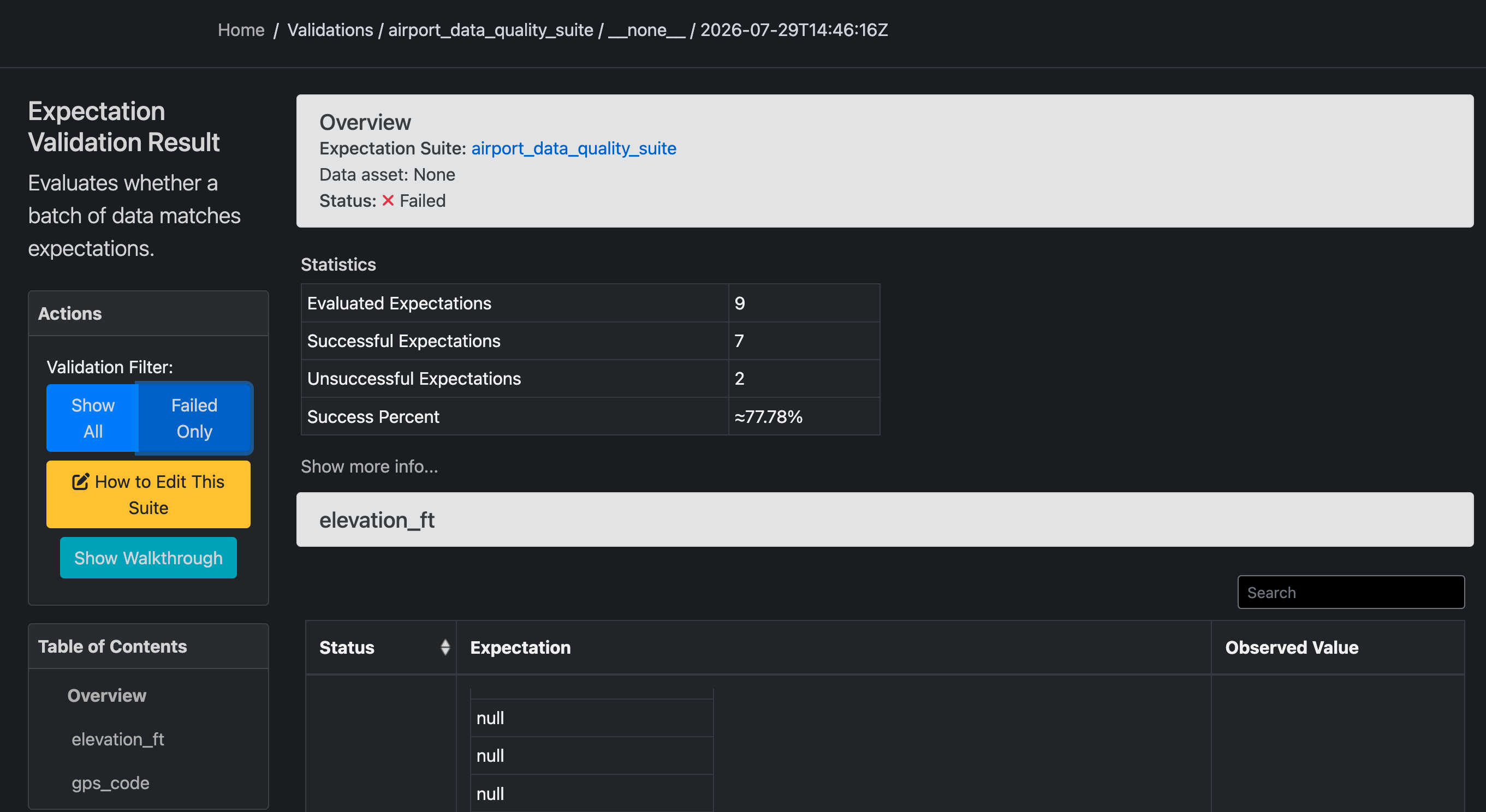
Great Expectations can automatically generate Data Docs, an interactive HTML report that documents the execution of each expectation.
The report provides detailed information about the validation process, including expectation results, execution statistics, and failed records. These reports facilitate collaboration between data engineers, data stewards, and other stakeholders by providing a centralized view of data quality assessments.
# Build Data Docs
context.build_data_docs()

# Open Data Docs
context.open_data_docs()
9. Automating the Workflow
One of the main advantages of Great Expectations is that the validation logic is reusable. Once the Expectation Suite has been defined, the same business rules can be applied to every new AIRAC data release without modifying the validation code.
In a production environment, this workflow can be integrated into an ETL/ELT pipeline, allowing data quality checks to be executed automatically whenever new data is ingested. This reduces manual effort, ensures consistent validation, and enables early detection of data quality issues.
New AIRAC Dataset
        │
        ▼
Load Dataset
        │
        ▼
Run Great Expectations
        │
        ▼
Validate Business Rules
        │
        ▼
Generate Data Docs
        │
        ▼
Publish Validation Report
10. Conclusion
This project demonstrated how Great Expectations can be used to automate business rule validation for airport data.
By implementing reusable expectations and applying them to a real-world dataset, the validation process becomes consistent, repeatable, and suitable for integration into automated data pipelines. The generated validation reports also provide a clear and accessible overview of data quality, supporting governance activities and improving confidence in downstream data consumption.
As a next step, this project will be extended by incorporating reasonability checks based on consecutive AIRAC cycles. Comparing historical data deliveries will make it possible to detect unexpected changes, such as unusual variations in record counts, missing values, or data distributions, complementing the intrinsic quality rules implemented in this notebook.
Finally, the validation workflow will be integrated into a dbt pipeline, demonstrating how Great Expectations can be incorporated into modern data transformation workflows to automate data quality validation as part of a production-ready data platform.